
Acceptance criteria tell everyone when a ticket is done. The developer knows what to build, QA knows what to test, and the person who asked for the change knows what they will get. Most teams agree on that. Few teams write them well, because a blank "Acceptance criteria" field gives no hint what good looks like.
So this post is mostly acceptance criteria examples: ten of them, for features, bug fixes, forms, permissions, performance and more. Copy them, change the nouns, and use them on your next ticket. Before the examples, two short sections explain the rules that make acceptance criteria useful and the two formats you can write them in.
What makes acceptance criteria good
Good acceptance criteria are a list of conditions that are either true or false when the work is finished. Each one passes or fails. There is no "mostly".
Four rules cover almost every case:
- Testable. Someone who did not write the ticket can check it. "The page loads fast" fails this rule. "The page loads in under 2 seconds on a 4G connection" passes.
- Observable by the user. Describe what a person sees or can do, not how the code does it. "A confirmation email arrives" is a criterion. "Use the queue service to send the email" is an implementation note and belongs elsewhere.
- Specific. Name the field, the limit, the message, the role. Vague words such as "user-friendly", "fast", "secure" or "handles errors" hide the decisions nobody made yet.
- Small in number. Three to seven criteria per ticket is normal. Twenty criteria usually means the ticket is really three tickets.
Two formats: checklist or Given/When/Then
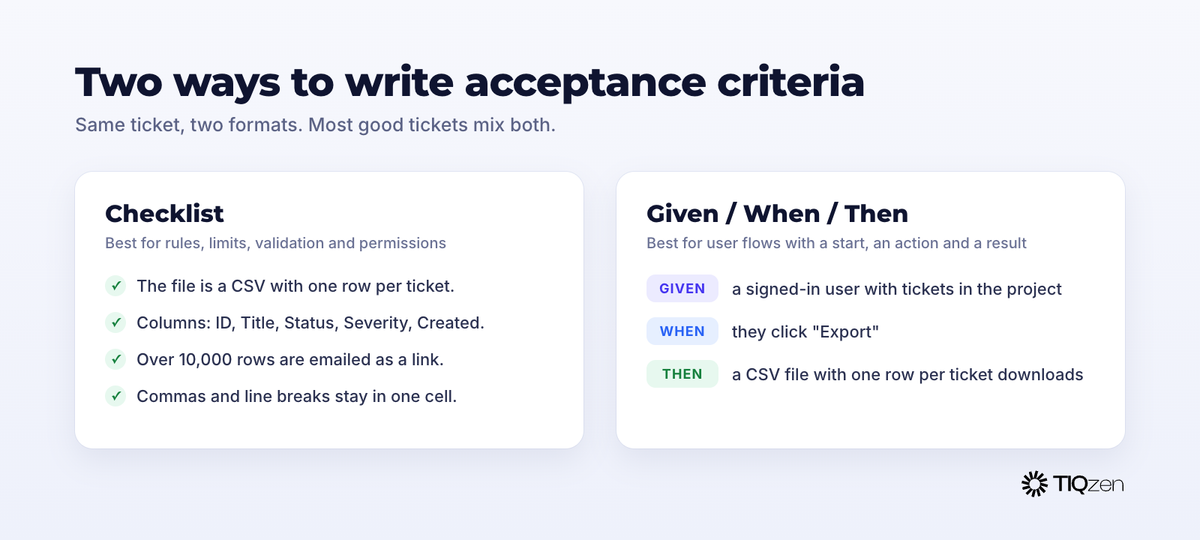
There are two common ways to write acceptance criteria. Both work. Pick per ticket, not per team.
| Format | Looks like | Best for |
|---|---|---|
| Checklist (rule-based) | "The export file is a CSV with one row per ticket." | Rules, limits, validations, permissions |
| Given/When/Then (scenario) | "Given a signed-in user, when they click Export, then a CSV downloads." | User flows with a clear start, action and result |
Given/When/Then comes from behaviour-driven development. "Given" is the starting situation, "When" is the action, and "Then" is the result you can check. It is great for flows and awkward for simple rules, which is why most good tickets mix both formats.
Acceptance criteria examples for features
1. Sign in with email and password
- Given a registered user on the sign-in page, when they enter the correct email and password and click "Sign in", then they land on their dashboard.
- Given a registered user, when they enter a wrong password, then the page shows "Email or password is incorrect" and the password field is cleared.
- After 5 failed attempts in 15 minutes, the account is locked for 15 minutes and the page says so.
- The email field accepts upper and lower case as the same address.
2. Reset a forgotten password
- The "Forgot password?" link on the sign-in page opens the reset form.
- Submitting a registered email sends a reset link within 1 minute.
- Submitting an unknown email shows the same message as a known one, so nobody can check which emails have accounts.
- The reset link works once and expires after 60 minutes.
- After a reset, every other session of that user is signed out.
3. Filter a list by status
- A "Status" filter above the list shows every status that exists in the project.
- Selecting one or more statuses shows only items with those statuses, and the count above the list updates.
- The filter stays applied after a page reload.
- "Clear filters" brings back the full list.
4. Export data to CSV
- Given a user with at least one ticket in the project, when they click "Export", then a CSV file downloads.
- The file has one row per ticket and a header row with these columns: ID, Title, Status, Severity, Created.
- Exports with more than 10,000 rows are emailed as a download link instead of downloading in the browser.
- Text with commas or line breaks stays in one cell when the file is opened in Excel or Google Sheets.
Acceptance criteria examples for bug fixes
A bug ticket needs acceptance criteria too. Otherwise "fixed" means "I could not reproduce it on my laptop". Good bug criteria state the correct behaviour and protect against the bug coming back.
5. Discount code dropped on payment retry
- Given a cart with a valid discount code, when the first payment fails and the customer retries, then the discount is still applied on the retry.
- The order total on the confirmation page matches the total shown before payment.
- The fix is covered by an automated test that fails on the old code.
- Orders placed with the bug are listed for the support team, so they can refund the difference.
6. Upload fails silently for large files
- Files up to 50 MB upload successfully.
- Files over 50 MB are rejected before the upload starts, with the message "Files must be 50 MB or smaller".
- If an upload fails for any other reason, the user sees an error and can retry. The page never shows a finished upload that did not finish.
Acceptance criteria examples for forms, roles and quality
7. Sign-up form validation
- Required fields are marked, and the form cannot be sent while one is empty.
- Errors appear next to the field they belong to, not only at the top of the form.
- An email that already has an account shows "This email is already registered" with a link to sign in.
- Everything the user typed stays in the form after an error.
8. Role-based permissions
- Only Admins see the "Delete project" button.
- A Member who opens the delete URL directly gets a "You don't have access" page, and nothing is deleted.
- Every delete is recorded with the user's name and the time.
9. Page performance
- The dashboard is usable (main content visible and clickable) in under 2 seconds for 95% of visits, measured over 7 days.
- The page makes no more than one request per widget on the first load.
10. Keyboard accessibility
- Every action in the dialog can be done with the keyboard alone.
- Focus moves into the dialog when it opens and returns to the button that opened it when it closes.
- The Escape key closes the dialog without saving.
Common mistakes in acceptance criteria
Most weak acceptance criteria fail in one of these five ways. Check your next ticket against them:
- Writing the solution instead of the result. "Add a Redis cache" is a design decision. "The report loads in under 2 seconds" is the criterion. Leave the how to the person who builds it.
- Using words nobody can test. Replace "fast", "intuitive", "robust" and "properly" with a number, a message or a behaviour.
- Forgetting the unhappy path. Wrong passwords, empty states, timeouts and missing permissions cause most bugs. Examples 1, 2 and 6 above each have a failure case.
- Mixing in the definition of done. "Code reviewed" and "deployed to staging" apply to every ticket. Put them in your team's definition of done, not in each ticket's acceptance criteria.
- Writing them after the work. Criteria written during review only describe what was built. Write them before the work starts, while they can still change the plan.
Acceptance criteria vs definition of done
The two are easy to confuse. Acceptance criteria are specific to one ticket: what this feature or fix must do. The definition of done is the same for every ticket: the quality steps your team always takes, such as code review, tests and documentation. A ticket is finished when it meets both.
Let AI write the first draft
Writing good acceptance criteria takes time, and the blank field is the hardest part. In Tiqzen, you describe the problem in one or two plain sentences and the AI assistant drafts the whole ticket: a clear title, a structured description and testable acceptance criteria, plus a suggested category, severity and dates.
The draft is grounded in the PRD documents attached to your project, so it uses your real feature names and user roles instead of generic boilerplate. Bug reports that arrive through the bug report widget get the same treatment, with the screenshot and console log attached. Your team reviews and edits the draft instead of starting from zero. See how AI ticket drafting works.
Whether you write them yourself or edit an AI draft, use the acceptance criteria examples above as a checklist: one result per line, a number instead of an adjective, and at least one failure case.